
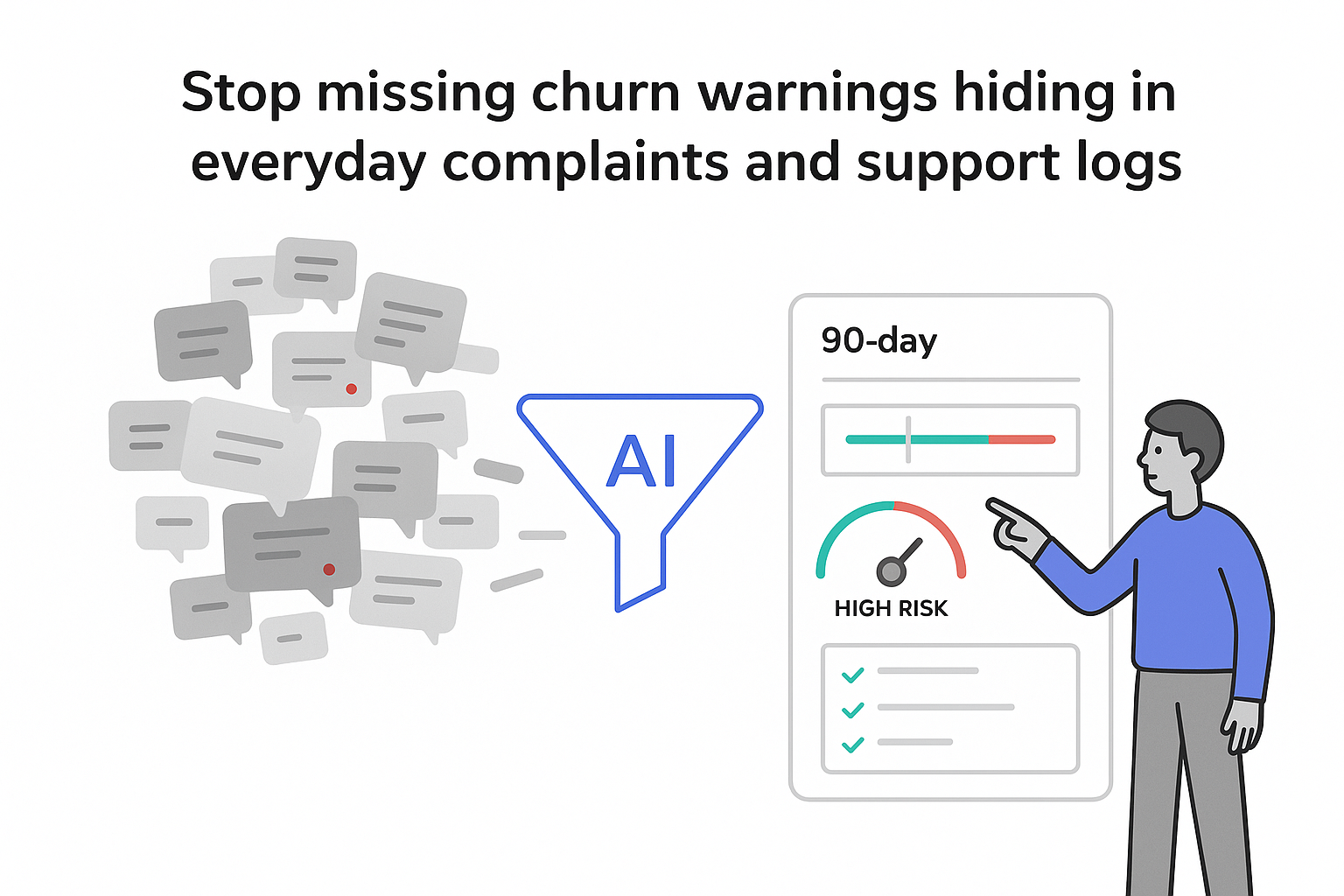
Customer feedback is probably pouring into my business right now: emails from frustrated champions, survey responses from quiet power users, support tickets, call transcripts, LinkedIn comments, and the occasional review-site rant. The data is there, but it’s scattered across systems, hard to interpret, and even harder to connect to revenue. Meanwhile, churn creeps up, deals stall, and product or service decisions lean on a handful of anecdotes.
AI tools for automating customer feedback analysis promise something simple but powerful: turn that messy wall of words into a clear, prioritized set of risks and opportunities I can act on, without spending hours tagging comments by hand.
AI tools for automating customer feedback analysis
The core frustration I hear from B2B founders and CEOs is consistent: they’re drowning in raw feedback yet still surprised when a big account churns or a renewal shrinks late in the cycle.
AI tools for automating customer feedback analysis are built to close that gap. Practically, they use machine learning (especially natural language processing) to read large volumes of written or spoken feedback, group it into themes, detect sentiment, and highlight what’s most likely to matter for churn, revenue, and product or service direction.
Instead of an operations manager manually tagging tickets or a product lead scrolling through call notes on a weekend, an AI system can continuously process incoming feedback. It typically pulls data from places like a helpdesk, CRM, surveys, chat logs, and call transcripts, then outputs structured insights into dashboards or workflows teams already use.
For a B2B service company, the value is less about “more data” and more about fewer blind spots. When feedback is consistently categorized across channels, I can spot patterns such as recurring onboarding friction in a specific segment, repeated “missing capability” mentions tied to lost deals, or service issues that cluster around renewals. (If you’re also mapping where those issues appear across the lifecycle, pair this with AI for B2B customer journey mapping.)
I like to think of the workflow as a simple pipeline:
Raw feedback (emails, tickets, calls) → AI analysis → themes + sentiment + priority → decisions with owners and deadlinesThat’s the promise in one line: less guesswork, more focused action. A useful reference point for this “turn insights into action” loop is Veritone’s Ingest-Analyze-Execute framing.
Why automate customer feedback analysis now
Customer conversations have exploded in volume. Even lean B2B teams can generate thousands of survey comments, ticket threads, shared-channel messages, and call transcripts each month. Humans can try to keep up, but the usual outcome is predictable: fatigue, small samples, and conclusions that skew toward whichever issues are most recent or most loudly expressed.
The math alone makes the case. If one person reads and tags 500 comments per week at two minutes each, that’s more than 16 hours, before I even factor in context switching, rework, and the inevitable inconsistency between reviewers. The cost isn’t just salary; it’s opportunity cost and slower decisions.
Automation tends to change three things at once: speed (feedback is processed continuously rather than quarterly), scale (coverage moves from a sample to “nearly everything”), and consistency (themes and labels don’t depend on who happened to review the data that week). That combination matters because missed signals usually surface later as higher churn, smaller renewals, longer sales cycles, and weaker fit in the segments I care about most.
It also helps with “quiet churn.” Some accounts don’t complain loudly. They mention small issues in tickets, give slightly lower scores, stop showing up to business reviews, and then leave at renewal. If I can’t connect those dots across channels, the warning signs stay invisible.
When automated analysis is set up well, early value usually comes from faster detection and tighter prioritization: identifying the themes behind low satisfaction in a profitable segment, spotting complaint spikes after a pricing or packaging change, seeing repeated objections in lost deals, or escalating high-severity issues that involve strategic accounts. If you want a clean way to tie objections back to pipeline outcomes, see AI based win loss analysis marketing.
What AI customer feedback analysis actually does
AI customer feedback analysis uses machine learning, primarily natural language processing, to interpret feedback from multiple channels and convert it into structured outputs: themes, sentiment, trend lines, and (in more advanced setups) suggested next steps.
It goes beyond score-only approaches like NPS or CSAT. Those scores tell me what people feel at a point in time, but not reliably why they feel that way, or what to fix first.
Most systems follow a similar sequence. They ingest feedback, clean and normalize it (deduplicating, stripping signatures, transcribing audio), analyze it (topic classification, clustering, sentiment, urgency), and then surface results in a way teams can use: dashboards, alerts, or ticket and task routing.

For B2B businesses with product usage data, the analysis becomes more useful when it’s paired with telemetry. Telemetry shows what customers do (adoption, drop-offs, errors, performance). Feedback shows what customers say and feel. Together, they let me test “why” questions more rigorously - for example, whether a reliability complaint correlates with a specific usage pattern, or whether a “confusing” theme clusters among customers who skip a key onboarding step. To make telemetry visible to the team, a concrete example is a User Analytics Dashboard.
If your biggest friction is onboarding (where early experience often dictates long-term retention), combine this approach with AI-aided onboarding for complex B2B products.
Key customer feedback data sources to include
Most companies underestimate where feedback actually lives. I’ve found it’s rarely just “surveys and support tickets.” A realistic view includes:
- Surveys (NPS, CSAT, onboarding surveys) with open-text comments that explain the score
- Support artifacts like tickets, email threads, and chat transcripts where customers describe friction in detail
- Sales and success conversations such as call notes, recordings, QBR notes, and renewal discussions where blockers and expectations show up clearly
- Public and community signals like reviews, community forums, user groups, and social mentions that reveal reputation shifts and recurring pain points
The main benefit comes from unifying these sources so I can see patterns across the journey. When feedback stays siloed, I end up with “support says X,” “sales says Y,” and “leadership believes Z.” When it’s combined, the story usually becomes sharper, and easier to act on. If call recordings are a major source for your team, Turn call recordings into marketing insights is a practical companion.
Metrics that make feedback actionable
Raw text is messy, and leadership teams don’t have time to read thousands of comments. I need a small set of metrics that answer two questions: “Is this getting better or worse?” and “What’s driving the change?”
For most B2B service businesses, the most decision-useful metrics tend to be:
- Satisfaction trends by segment and touchpoint (for example, onboarding vs. ongoing delivery), so I can isolate where experience breaks
- Theme volume and severity over time, so recurring issues don’t get dismissed as one-off complaints
- Account-level risk signals, especially when sentiment worsens alongside operational indicators like rising ticket volume or delayed delivery milestones
- Time-to-resolution for high-impact issues, because slow fixes often translate into renewal risk
- Revenue-linked requests and objections, capturing what blocks deals, expansions, or renewals
The key advantage of automation is not that it invents new metrics - it keeps the existing ones current and traceable. I can go from “satisfaction dropped in this segment” to “these are the themes causing it” without waiting for a monthly deck.
Major AI capabilities to look for
Modern AI feedback analytics can include dozens of features, but I focus on capabilities that translate into clearer priorities and fewer surprises:
- Sentiment and emotion detection to flag deteriorating experiences early (especially useful when paired with segment or account views)
- Topic modeling and theme clustering to group feedback into stable categories I can track over time
- Intent and urgency detection to surface “this is about to escalate” signals that don’t always show up as explicit complaints
- Anomaly detection to catch sudden spikes after releases, policy changes, staffing shifts, or process updates
- Summarization to turn long threads and call transcripts into usable briefs with clear next steps
- Predictive risk modeling (when the data supports it) to prioritize outreach and intervention based on historical patterns
I don’t treat these capabilities as magic. Models can misread sarcasm, struggle with domain-specific jargon, and behave inconsistently across languages or regions. In mature setups, humans stay in the loop for high-stakes decisions, especially anything involving top-tier accounts, compliance-sensitive situations, or major roadmap commitments.
Where sentiment analysis helps - and where it misleads
Sentiment analysis is usually the first capability leaders ask about because it’s intuitive: positive, negative, neutral, and sometimes more granular emotions like “frustrated” or “confident.”
Used well, it helps me spot trends that lagging metrics won’t show until it’s too late. For example, a single account might give a decent score but steadily express frustration in tickets and calls. A sentiment trend line across channels can highlight that drift earlier than a quarterly survey.
Used poorly, sentiment can mislead. Generic models often misinterpret technical language or slang, and short comments (“ok,” “fine,” “works”) are ambiguous without context. That’s why I treat sentiment as one layer - useful for monitoring, but stronger when paired with themes, segments, and real business outcomes like churn, renewals, and cycle time.
B2B customer feedback analysis in action
Here’s a realistic example I use to illustrate how this works.
Imagine a mid-market B2B agency managing digital campaigns for around 200 clients. Feedback is everywhere: account managers keep personal notes, surveys run twice a year, tickets sit in a separate system, and leadership hears about issues only when a client is already upset. Churn sits around 18% annually, and the team debates causes without shared evidence.
After consolidating a few sources (survey comments, support tickets, and key account call transcripts) and applying theme clustering plus sentiment tracking, the agency can finally see repeatable patterns: one vertical repeatedly mentions “no visibility into campaign changes,” reporting clarity complaints correlate with higher churn, and several lost deals cite a missing integration that isn’t prioritized.
The actions don’t need to be dramatic to be effective: add a change log and consistent weekly recaps, standardize reporting templates and onboarding education, and re-evaluate integration priorities based on how often they block revenue in key segments. The operational win is that decisions stop relying on the most recent escalation and start reflecting the full feedback reality.
How I evaluate customer feedback analytics tools
When I look at tooling options, I avoid chasing buzzwords and focus on fit-for-purpose criteria.
First, I check whether the tool can reliably connect to the systems where feedback actually lives (CRM, helpdesk, surveys, chat, and call transcripts) without brittle custom work. Next, I look at how it handles messy, real-world text: long threads, mixed languages, duplicates, and domain-specific vocabulary.
I also pay attention to whether categories and themes are configurable enough to match my business (segments, offerings, and lifecycle stages), and whether the reporting is usable for different roles. A leadership view should answer “what changed and what matters,” while product or operations views should answer “what’s broken, for whom, and how often”.
Finally, I take data governance seriously: how PII is handled, what controls exist for access and retention, and whether security and compliance expectations are realistic for my customer base. If feedback analysis becomes a decision system, it needs the same discipline I’d apply to any other source of truth. If you’re comparing vendors, Selecting AI martech vendors: a procurement framework can help structure the evaluation.
A practical 90-day way to get started
I don’t need a massive transformation to prove value. A focused 90-day rollout is often enough to create momentum:
- Days 1-30: pick one high-impact use case (like reducing churn in one segment, improving onboarding, or shortening sales cycles) and define a short list of success metrics tied to that use case. I keep sources limited at first, usually two or three.
- Days 31-60: connect data and validate themes by reviewing AI-generated topics weekly. The goal is alignment and usefulness, not perfection: do the themes match what customers actually mean, and can my teams act on them?
- Days 61-90: operationalize the insights by adding the key metrics and top themes to a recurring leadership cadence, assigning owners to the top issues, and setting simple intervention rules for at-risk accounts.
The main failure modes are predictable: messy historical data, unclear ownership, and over-trusting the model. I address those by prioritizing recent data first, naming a single accountable owner, and using AI outputs as decision support, not autopilot.
When feedback analysis becomes a weekly habit instead of a quarterly scramble, I stop relying on the most vocal customer or the most recent escalation. I get a clearer, more complete view of what customers are actually experiencing, and what that means for churn, renewals, and growth. If you’re planning to scale this beyond one team, it also helps to invest early in foundations like Marketing data lakes that serve LLM use cases.



.svg)

.svg)
.svg)